Live · 24 Oct 2026 SPX 7,623.68 -0.52% NDX 28,957.53 +0.00% VIX 19.45 +2.21% GOLD 4,010.00 -1.24% CL 103.44 +3.99% BTC 80,593.40 -0.88%
Free TradingView indicator

[TP] Trend Lines & Channels - Mentor

Trend lines and channels drawn the honest way. Every line says when it became known, every mark sits on the candle that settled it, and failed breaks stay on the chart. Nothing is quietly wiped to make the history look better.

Most auto trend line tools wipe old lines and failed breaks when a new line forms, so their history only shows the breaks that worked. This one keeps every break, judges it on finished candles, and gives a plain read on top: Up, Down or Sideways, how strong, why, and the price where that read would be wrong.

Coming to TradingView on 16 Nov

--days--hours--mins--secs

How to read it
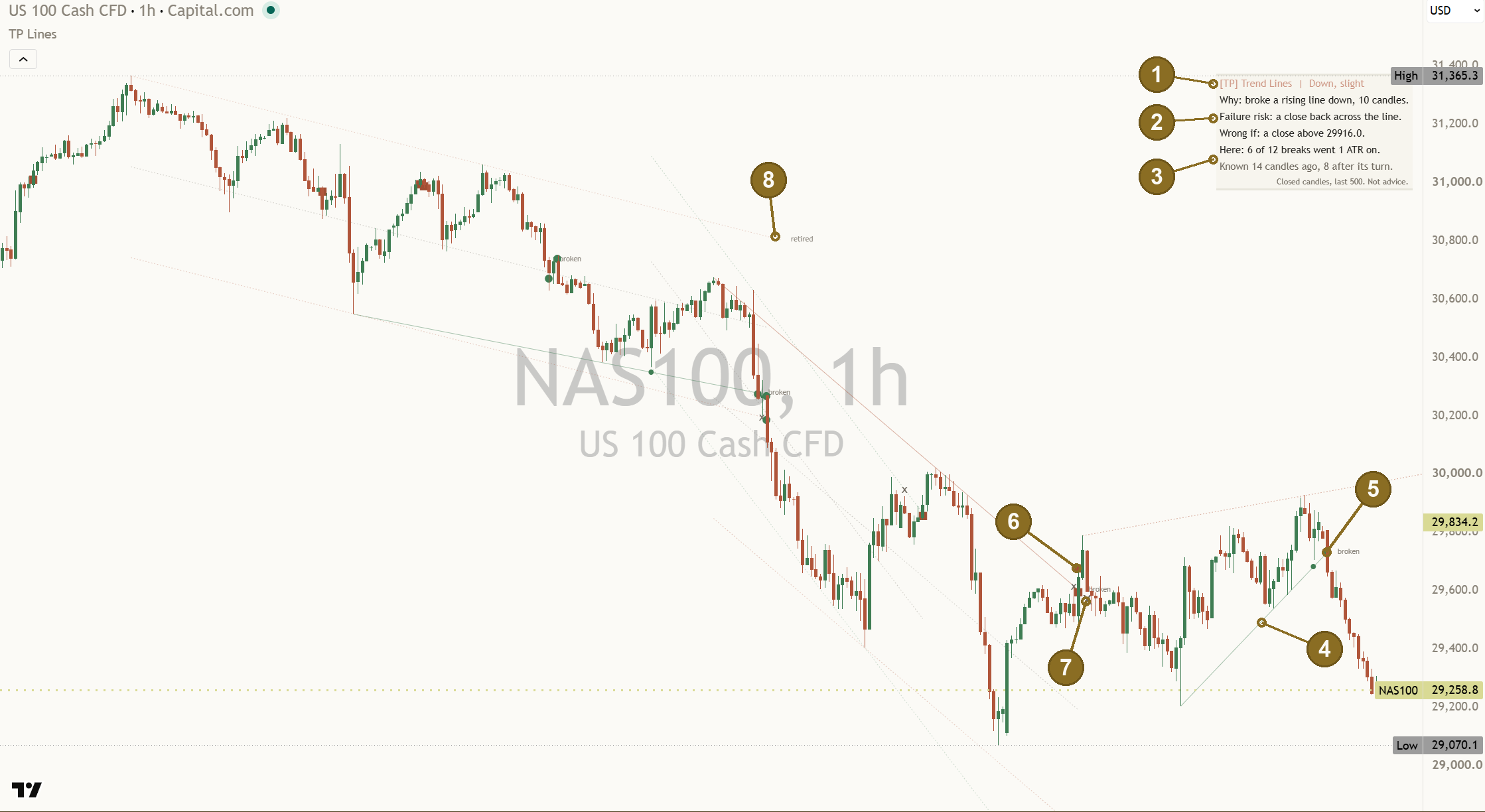
[TP] Trend Lines & Channels - Mentor on a Nasdaq 100 (NAS100) one-hour chart: a broken rising line kept pale on the chart with its filled circle, a clay square where an earlier break failed, small grey crosses where a test gave way, a retired line, and the Mentor panel at the top right reading Down, slight.
Nasdaq 100 (NAS100) one hour, default settings with the panel moved to Top Right, read on 22 Oct 2026. A real chart, an example only, not a recommendation.

What it is in 30 seconds

It finds the trend lines you would draw by hand, lines that touch real turns at least three times, adds the channel when there is one, and tells you in plain words what price is doing against them. It describes what has happened on this chart. It does not say what comes next.

Lines that look hand-drawn

A line needs three touches by default, with no close beyond it in between. One live line over price and one under it, at most. With only two touches a line shows faint and dotted, named "tentative", and it never counts as an event.

Honest about timing

A turn in price is only known some candles after it happens, so a line through it can only appear that late. The panel says so: "Known 14 candles ago, 8 after its turn." Marks sit on the candle that settled them, never earlier.

A read, with its exit sign

The header always gives a read, Up, Down or Sideways, with its strength in words, a reason, the main risk, and the price where the read would be wrong. It changes only after two finished candles agree.

Why you can trust what it drew yesterday

"Repaint" means three different things, and trend line tools are guilty of all of them. Here is what each one is, and what this indicator does about it.

  1. 1. Late lines (it cannot be avoided)A swing high is only a swing high once a few lower candles follow it (8 by default, "Swing size"). So a line through it appears that late. Many tools hide this. This one says it on every line: "Known from" a date in the tooltip, and "Known N candles ago, K after its turn." on the panel. No break is counted before the line was known.
  2. 2. Marks drawn back in timeSome tools put the mark back at the turn, so on old charts it looks as if the line was known all along. Here the line is drawn through its real touches, where it belongs, but every mark sits only on the finished candle that settled it.
  3. 3. Losers deletedThe worst kind: old lines and failed breaks are wiped when a new line forms, so only the winners remain. Here a failed break stays as a clay square, a broken line stays pale and tagged "broken" ("Kept on the chart, not deleted."), and the counts on the panel include every failure.
Finished candles only

Touches, breaks, retests, the read and every alert wait for the candle to close. A candle still forming can change nothing.

The regression channel says it moves

A regression channel refits on every candle, so it always moves. Its tooltip says so, and when price closes outside it, a frozen copy is left where the break happened, tagged "frozen".

Check it yourself

Open Bar Replay and step one candle at a time. No mark appears before its candle closes, and nothing that was drawn disappears. The only things that change are a faint open ring settling into its final mark, and the oldest marks making room once the cap you set is reached.

Each part, up close

Lines that hold up are drawn in the up colour, lines that hold price down in the down colour, and old lines stay thin and pale. Marks use shapes as well as colour, so their meaning never depends on colour alone.

Tlc el panel

The read

The header always names the most likely outcome: "[TP] Trend Lines | Down, slight". Up, Down or Sideways, with the strength in words: slight, moderate or strong. Slight is the honest answer when the evidence is thin. It never says "no clear lean".

Strength is how much of the indicator's own evidence on this chart agrees: do the lines point the same way, and have past plays of this kind on this chart mostly worked? It is agreement, not odds. A read younger than 3 closes cannot be strong.

The read changes only when the new read has held for 2 finished candles in a row ("Closes to confirm a read change", 1 to 5). So it does not flip back and forth on every wiggle.

Back to the chart
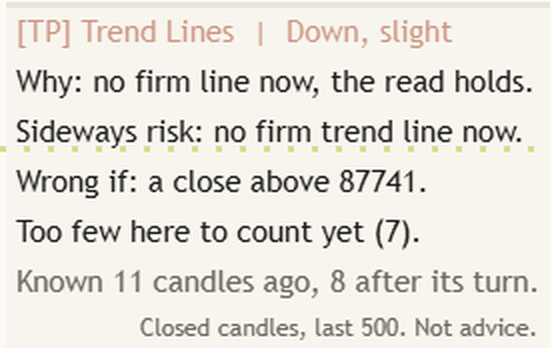
Close-up of the Mentor panel on a Bitcoin daily chart: Down, slight, Why: no firm line now, the read holds, Sideways risk: no firm trend line now, Wrong if: a close above 87741, and Too few here to count yet (7).

Why, the risk, and Wrong if

Under the header come three lines. "Why" names what the read rests on, for example "Why: broke a rising line down, 10 candles." or "Why: holding above the rising lower line." The risk line names the main thing that could undo it: "Failure risk: a close back across the line." or "Sideways risk: no firm trend line now."

"Wrong if" gives the price on this chart where the read would be wrong: "Wrong if: a close above 29916.0." It sits a little past the line, so a close right on the line is not a miss. A Sideways read shows its range instead ("Range: ... (last 20)") and is wrong on a close outside it.

When a change is coming, the risk line counts it down: "Failure risk: down on 1 more close." When price closes past Wrong if, the read drops to slight at once and says so: "Failure risk: past the Wrong-if level."

Back to the chart
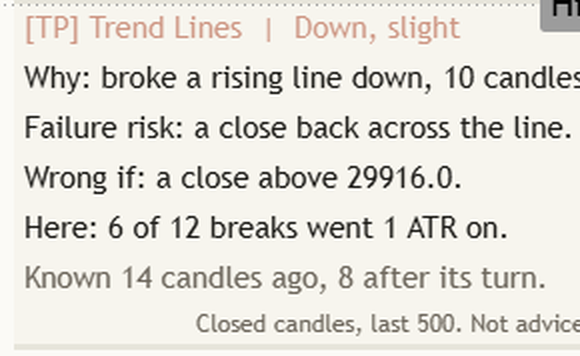
The same Mentor panel close-up: the row Here: 6 of 12 breaks went 1 ATR on, and the row Known 14 candles ago, 8 after its turn.

This chart's count, and "Known"

"Here: 6 of 12 breaks went 1 ATR on." counts what past events of the same kind did on this chart, in the last 500 candles, failures included. A break "went on" if price moved one more ATR (the average candle range over 14 candles) in the break's direction within 10 candles, before any close back across the line. Under 8 events it says "Too few here to count yet (7)." Hover the row to see the split: held, failed, neither, and up against down.

"Known 14 candles ago, 8 after its turn." says when the line the read rests on could first have been drawn, and how late that was after the turn it passes through. Every trend line tool has this delay; this one shows it instead of hiding it.

Back to the chart
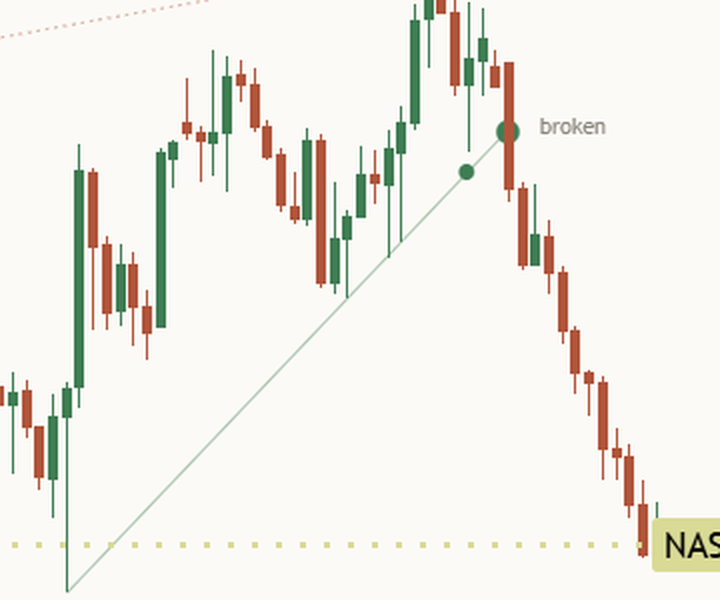
Close-up on a light chart: a thin pale rising line under price, broken when price closed below it, tagged broken, with a filled circle on the break candle and a small dot where the line was touched before.

A broken line, kept

When a valid line breaks, it is not deleted. It ends at the break candle, turns thin and pale, and its tag reads "broken". Hover it and the tooltip says when it broke, how many touches it had, when it was known, and "Kept on the chart, not deleted."

The last 4 broken lines stay ("Broken lines kept", 0 to 20). Each line's starting turns are used once only, so you never get a fan of lines sprouting from one low.

Back to the chart
The same close-up: the filled green circle on the candle that closed below the rising line, where the break went on.

 Filled circle: held or went on

A green circle sits on the candle that settled the event, at the line. For a break, it means price went one more ATR in the break's direction within 10 candles. For a touch of the line, it means price moved one ATR away from it. A smaller dot marks a touch.

While an event is still being watched a faint ring sits there instead ("Show still-open event"), and it turns into its final mark when its window ends. That is the only mark that ever changes, and it changes in place.

Back to the chart
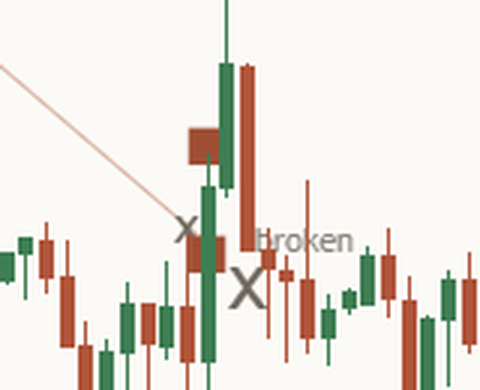
Close-up on a light chart: a clay square on the candle where a break of a falling line closed back across it, next to small grey crosses and the broken tag.

 Clay square: a failed break

A clay square means a break closed back across the line within 3 candles, or a break or channel break closed back before it went anywhere. This is the mark other tools delete. Here it stays, and it stays in the count.

Failed-break squares have their own, longer cap: the last 30 stay on the chart ("Failed-break marks kept", 0 to 60), however many other marks you choose to show.

Back to the chart
The same close-up: the small grey crosses where a line test gave way.

Small cross: gave way

A small grey x means a line test, a channel test or a retest did not hold: price closed beyond the line before it moved away. It is not a failed break, so it gets its own shape, and it is counted with its own kind of event.

A grey ring means neither: the event's window ended with no clear result. The newest 12 marks are drawn ("Marks shown", 0 to 30); the counts always use every event.

Back to the chart
The full Nasdaq 100 chart: near the top middle, a faint dotted falling line ends at a small tag reading retired.

A retired line

A line nobody has touched for 120 candles ("Retire a line after, candles"), or that price has left far behind (no touch for 60 candles and more than 8 ATR away, "Retire a line beyond, ATR"), is retired. It is cut where it was retired, stays pale and dotted, and is tagged "retired". It was never broken, so it carries no event.

That keeps the live lines near price, so the panel's lines and its Wrong if price are always a few candle ranges away, not off the top of the screen.

Back to the chart

Two panel layouts

Standard (default)

The read and its strength, Why, the range on a Sideways read, the risk line, Wrong if, the play's own price (a channel line, or one channel width after a channel break), this chart's count, when the line was known, and the footer "Closed candles, last 500. Not advice."

Full

Everything in Standard, plus the play in words ("Broke below the rising line, 10 candles."), what backs the read ("Backing: the lines agree."), the line's facts ("Rising line, 4 touches, 86 candles old.", worked example), its slope in ATR per 10 candles, the regression fit when it is on, the mark legend "● held ■ failed break x gave way ○ open" and a teaching line.

The plays it names

Each play is a textbook pattern with a price from this chart. The panel names it and gives the price where the read would be wrong. It says where price is, never what to do.

Trend line break

"Why: broke a rising line down, 10 candles."

A finished candle closed beyond a valid line by at least 0.1 ATR ("Break needs a close beyond by, ATR"). The read takes the break's direction and is wrong on a close back across the broken line.

Failed break

"Why: failed break up, back under the line."

The break closed back across within 3 candles. The read turns against the break, and the panel names the other line in play. "A failed break is a fact, not a forecast."

Break and retest

"Why: broke up, back at the line and held."

After a break, price came back to the broken line within 2 to 20 candles and closed on the break side. Counted on whether it held for 10 candles.

Line test

"Why: holding above the rising lower line."

Price touched a valid line again and closed on its side. Counted on whether price then moved one ATR away before closing beyond it.

Channel

"Why: in a rising channel, upper half."

A line parallel to the trend line through the furthest price on the other side (the return line), with a dashed mid-line. A rising channel reads Up and a falling one Down; near the far line the read drops to slight ("Failure risk: at the channel top."). A nearly flat channel reads Sideways.

Channel break and one channel width

"Why: closed out of the channel, up."

After a close outside the channel, a thin gold dotted line marks one channel width beyond the break, while that move is open. "A measured move is a distance, not a goal."

Regression channel (off by default)

Turn on "Regression channel" (Auto fit or Fixed) for a least-squares channel on the closes. Full adds how well a straight line fits the past closes: "Fit: strong (R 0.93) over 148 candles." (worked example). It describes the past; it is not a forecast. After a close outside it, the panel reads back toward the mid-line, and "The mid-line is an average, not a magnet."

What the count says, honestly

Every number on the panel comes from the chart it sits on. The count takes this chart's finished events of the same kind in the last 500 candles, failures included, and nothing else.

Failures stay in

"Here: 6 of 12 breaks went 1 ATR on." on the Nasdaq chart above means the other 6 did not: they failed or did neither. Because failed breaks are never deleted, the count cannot quietly improve itself.

Too few is said out loud

Under 8 events the panel says "Too few here to count yet (7)." instead of a number that would mean little.

It answers "which settings?"

The loudest question under trend line tools is which timeframe or setting works best. The count answers it for the chart you have open: change the timeframe and see how breaks have gone there.

How the Mentor helps you at every level

Same indicator, same panel. What you take from it grows with you. The quoted lines are the panel's own words.

  1. Level 1

    Beginner

    What gets in the way

    • Joining any two highs and calling it a trend line.
    • Believing a chart where every break worked.
    • Not knowing what a line on the chart is for.

    The habit it builds: a line needs three touches, and every line on the chart says what it is.

    What the Mentor says

    Teaching line"Three touches make a line, not a promise."

    Teaching line"Lines are drawn after the turn, not at it."

  2. Level 2

    Intermediate

    What gets in the way

    • Calling a wick through the line a break.
    • Forgetting the break that failed last week.
    • No price that says the idea was wrong.

    The habit it builds: breaks judged on closes, failures kept in view, and a Wrong if price every time.

    What the Mentor says

    Why (NAS100 1h, 22 Oct 2026)"Why: broke a rising line down, 10 candles."

    Wrong if (same chart)"Wrong if: a close above 29916.0."

  3. Level 3

    Advanced

    What gets in the way

    • Trusting a pattern without checking this chart's history.
    • Ignoring how late a line really appeared.
    • Reading a channel's far line as a sure turn.

    The habit it builds: checking the count, the timing and the backing before trusting a line.

    What the Mentor says

    This chart (NAS100 1h, 22 Oct 2026)"Here: 6 of 12 breaks went 1 ATR on."

    Timing (same chart)"Known 14 candles ago, 8 after its turn."

  4. Level 4

    Expert

    What gets in the way

    • Treating a measured move as a destination.
    • Treating a regression mid-line as a magnet.
    • Changing settings until an old chart looks clean.

    The habit it builds: a steady second pair of eyes that states its limits every time.

    What the Mentor says

    Teaching line"A measured move is a distance, not a goal."

    Teaching line"A channel can widen, bend or break."

Three things to remember

  1. A line is a guide drawn on the past. It shows where price turned before, not where it must turn next.
  2. Every read has a Wrong if price. Look at it first. It tells you how far price can go before the read is wrong.
  3. History, not a promise. The counts describe this chart's past events, failures included. The next one can go either way.

Honest about timing, honest about limits

Log charts

Pine scripts cannot see whether your chart uses a log scale. On a log chart, set "Line maths" to Log and every line, channel and width is worked out in log terms, so they stay straight.

What it does not do

No arrows, no percentages, no wedges or triangles (a pattern Mentor of their own, later), and no claim about what comes next. It does not draw pitchforks yet. Change the swing size or the touches needed and the lines change, so the counts do too. None of those settings is the right one.

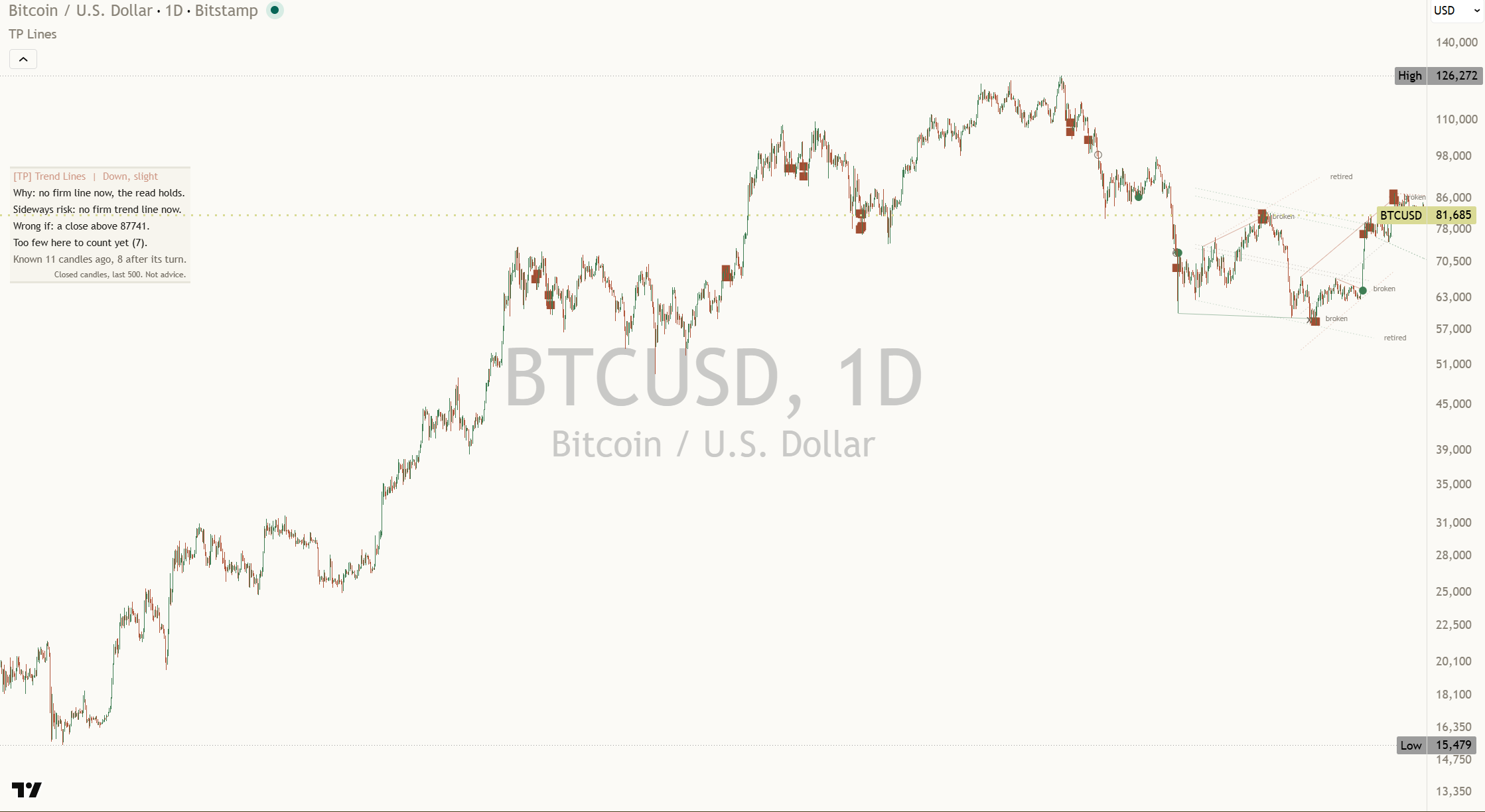
Bitcoin (BTCUSD) daily chart on a log scale with Line maths set to Log: straight lines near the latest candles, clay squares at failed breaks, broken and retired tags, and the Mentor panel reading Down, slight with Too few here to count yet (7).
Bitcoin (BTCUSD) daily on a log scale, "Line maths" set to Log, read on 22 Oct 2026. The panel says "Too few here to count yet (7)." rather than show a number that would mean little.

Settings

The defaults work out of the box. These are the ones worth knowing.

On a small screen, swipe the table sideways to see every column.
SettingWhat it doesDefault
Swing sizeCandles on each side of a turn. A turn is only known this many candles after it, so every line appears that late. Smaller is quicker and noisier (2 to 30).8
Touches neededTurns a line must touch before it counts (2 to 5). With fewer, the best two-touch line shows faint and dotted, named tentative.3
Touch on / Touch tolerance, ATRWhether wicks or candle bodies count as touches, and how close a candle must come to the line.
WicksBodies
Wicks; 0.25
Break needs a close beyond by, ATR / Closes neededHow far past the line a finished candle must close for a break, and how many closes in a row (1 or 2).0.1; 1
Line mathsPick Log if your chart uses a log scale, so lines stay straight there.
LinearLog
Linear
Line lookback, candles / Retire a line after, candles / Retire a line beyond, ATRHow far back a line may start, when an untouched line is retired, and how far from price an untouched line may drift before it is retired.200; 120; 8.0
Broken lines kept / Frozen channels keptHow many broken lines and old channels stay on the chart, pale and named.4; 3
Channel from the trend line / Mid-lineThe return line parallel to the trend line, and the dashed line halfway between.On; On
Regression channel / Regression length / Regression widthA least-squares channel on the closes. Auto fit picks the length that fits best.
OffAuto fitFixed
Off; 100; 2 sd
Mark past events / Marks shown / Failed-break marks keptThe marks on settled events, how many to draw, and the separate cap for failed-break squares. None of these changes the counts.On; 12; 30
Show still-open event / Measured levels / Mark sizeA faint ring while an event is still being watched; the gold "1 channel width" line; how big the marks are.On; On; Normal
Closes to confirm a read changeThe header changes only after the new read holds this many finished candles in a row (1 to 5).2
Show the Mentor panel / Panel detail / Where to put the panelStandard or Full panel, in any of nine spots. Bottom Left leaves blank rows clear of the TradingView logo.
StandardFull
On; Standard; Top Left
Panel text size / Panel colours / Panel background / Line widthColours on Auto match your chart background: Paper on a light chart, Ink on a dark one. See-through keeps a light tint behind the text.Small; Auto; See-through; 3

Every setting has a small (i) next to it. Hover over it, or tap it on a phone, and it explains that setting in plain English, right there on your chart.

Light or dark, it matches

The lines, marks and panel come in a warm light and a warm dark palette. The marks keep their shapes in both, so their meaning never depends on colour alone.

Alerts

Each alert says what happened, once, after the candle closes. None of them tells you what to do.

  • Any trend line eventone alert for every event below, up or down.
  • Price at a trend line (touch, held)price touched a trend line and closed on its side.
  • Trend line broken up / Trend line broken downa finished candle closed beyond the upper or lower line.
  • Break and retest / Failed breakprice came back to the broken line and held, or the break closed back across within 3 candles.
  • New valid linea trend line reached the touches needed.
  • Channel line touched / Channel broken / One channel width reachedthe channel's events, in plain words.
  • Regression mid-line reached / Regression channel brokenthe regression channel's events, when it is on.
  • Read changed to up / down / sideways, Read changed (any)the header read changed after the confirming closes.
  • Wrong-if level brokena close past the read's Wrong if price.

With "Plain-words alerts" on, choose "Any alert() function call" and one alert per candle names every event with its price, and with "Read alerts with levels" on it adds the read and its Wrong if price, for example "Read now Up, slight. Wrong if: a close below 4084.207." (gold, one minute, 22 Oct 2026).

TradingView shows a general note, "This alert may not function as intended", on scripts that draw lines and labels. It is a standard warning for this kind of script. The alerts here fire once, on the finished candle, and were checked live on 22 Oct 2026.

Learn more

Start with the lesson, then watch the indicator explained.

Foundry lesson

Trend lines and channels: drawn honestly

What makes a line valid, why breaks are judged on closes, retests and failed breaks, channels and the measured move, and why most tools repaint. Concept first, indicator second, with a quiz.

Open the lesson
Trading journal

Keep a study log

Note each break as it happens, write down its Wrong if price, then record what happened, right or wrong. Over time your own notes show you more than any single chart.

Coming soon

Watch it explained

Coming soon Video, about 2 minutes

How to read [TP] Trend Lines & Channels - Mentor

Every part of the indicator on a real chart: the lines and when they became known, the marks, the kept failures, and the read with its Wrong if price.

Coming soon Video, about 2 minutes

Trend lines that keep their misses

Why so many trend line tools repaint, the three kinds of repaint, and how to check any line tool in Bar Replay. Concept first, then the indicator.

One concept, read well

[TP] RSI - Mentor, [TP] Volume - Mentor, [TP] Market Structure - Mentor, [TP] Trend - Mentor, [TP] VWAP - Mentor, [TP] Fibonacci - Mentor, [TP] MACD - Mentor, [TP] Bollinger Bands - Mentor, [TP] Regime - Mentor, [TP] Market Board - Mentor, [TP] Order Blocks - Mentor, [TP] Support and Resistance - Mentor, [TP] Volume Profile - Mentor, [TP] Trend Lines & Channels - Mentor and [TP] Elliott Wave - Mentor each read one thing deeply, for free. Markets rarely move on one thing. The full Titan suite reads them together: momentum, volume, trend structure and flow, combined into one plain-English read.

Questions

Is it free?

Yes. [TP] Trend Lines & Channels - Mentor will be free on TradingView from 16 November 2026. Add it from the Indicators menu. Nothing is locked.

Does it repaint?

No mark, count or kept line changes after its candle closes. Two things are worth knowing. A line can only appear some candles after the turn it passes through (that is true of every trend line tool, and here the panel shows how late). And the optional regression channel refits on every candle, which its tooltip says; when price closes outside it, a frozen copy stays where it broke. Failed breaks are never deleted. Check it in Bar Replay.

Why is the line drawn back to the first touch if it was only known later?

Because that is where the line truly runs, the same as one you would draw by hand. What matters is that nothing is judged before the line was known. Marks sit only on the candle that settled them, and the tooltip says "Known from" the date the line could first be drawn.

Where does the header read come from?

From the line or channel price is dealing with now: a break, a retest, a failed break, a test of a line, the channel's slope, or the two lines framing a range. It is always Up, Down or Sideways with a strength in words, a Why, a risk line and a Wrong if price. It changes only after 2 finished candles agree. A close past Wrong if drops it to slight at once. The read says where price is and where it would be wrong, not where it will go.

Where do the panel's numbers come from?

From the chart it sits on, and nothing else: this chart's finished events in the last 500 candles, failures included. No number is carried in from other markets or from an offline study.

Why three touches?

Any two turns can be joined by a line, which is why many auto tools draw too many lines. Classic texts call a two-point line tentative and a third touch the one that confirms it. You can set 2 to 5; with 2, the lines show but carry no events until a third touch.

Which timeframe should I use?

Any. Lines are worked out from the candles of the chart you have open. On very fast charts (one minute) there are more failed-break squares, because there are more breaks; from five minutes up they read calmly. The count on the panel shows how breaks have gone on the timeframe you chose.

Does it tell me when to act?

No. It describes the lines, what price did at them, and where its read would be wrong. It cannot see what comes next. Decisions stay with you.

Get our weekly market brief free.