Live · 22 Oct 2026 SPX 7,663.43 -1.21% NDX 28,958.69 -2.90% VIX 19.03 +14.09% GOLD 4,039.80 -2.66% CL 99.10 -2.64% BTC 81,390.93 -3.12%
Free TradingView indicator

[TP] Trend - Mentor

A trend indicator that explains itself: three moving averages, a closed-bar Supertrend, how long the trend has held, and a gold box when the market is simply going sideways, in plain English.

It checks whether three moving averages are in order and whether Supertrend agrees. The panel names the state, counts how many closed bars it has held, and compares the chart with two larger timeframes. Sideways stretches get a faint amber background and a gold box around the range, and the panel counts how long it has been sideways instead of forcing a direction. Everything waits for the bar to close, so nothing repaints.

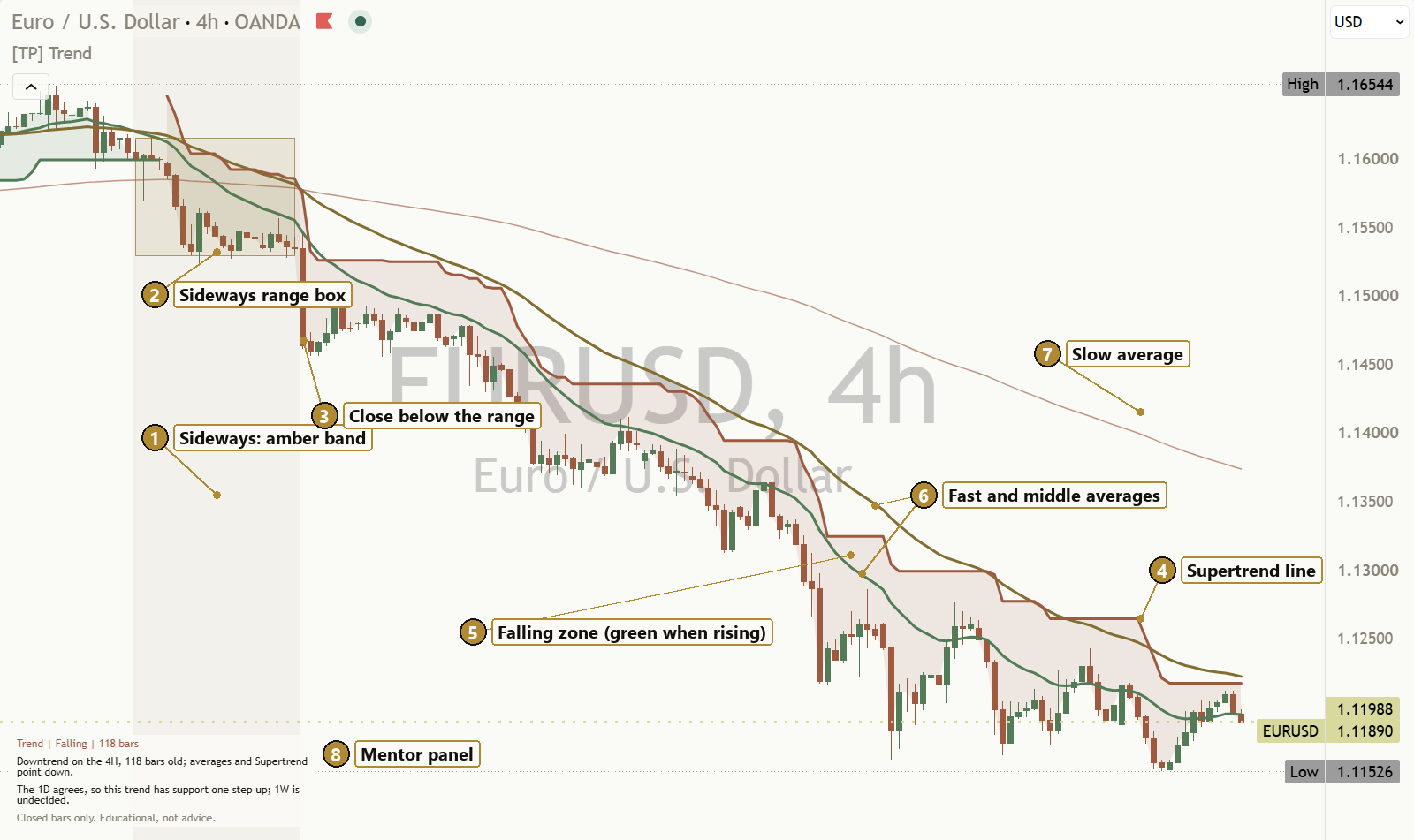
[TP] Trend - Mentor on a light EURUSD 4 hour chart: a long downtrend with the green fast, gold middle and pale orange slow moving averages stacked down, an orange Supertrend line above price with a light filled zone, an earlier sideways stretch shaded amber with its gold box, and the Mentor panel at the bottom left reading: Trend, Falling, 118 bars. Downtrend on the 4H, 118 bars old; averages and Supertrend point down. The 1D agrees, so this trend has support one step up; 1W is undecided.
A real chart, default settings. Example only, not a recommendation.

What it is in 30 seconds

A trend is a direction price has held for a while. One common way to read it is the order of three moving averages: fast above middle above slow is rising, the mirror is falling, and anything else is tangled. A second tool, Supertrend, checks the read. When they agree, the trend is clearer. When they disagree, the honest answer is mixed. A trend read describes what price has done. It does not say where price goes next.

It talks to you

The Mentor panel, on the left of the price chart, leads with the answer: "Downtrend on the 4H, 118 bars old; averages and Supertrend point down." It names the state and its age, then what two larger timeframes say. Switch to the Full style for how steady the trend is, the preset in use and a colour key.

It waits for the close

The state, the trend age, the Supertrend line, the amber background, the gold box and all 5 alerts only change when a bar closes. A flip you see on the chart does not vanish a moment later. The panel footer says it plainly: "Closed bars only. Educational, not advice."

It is honest about sideways

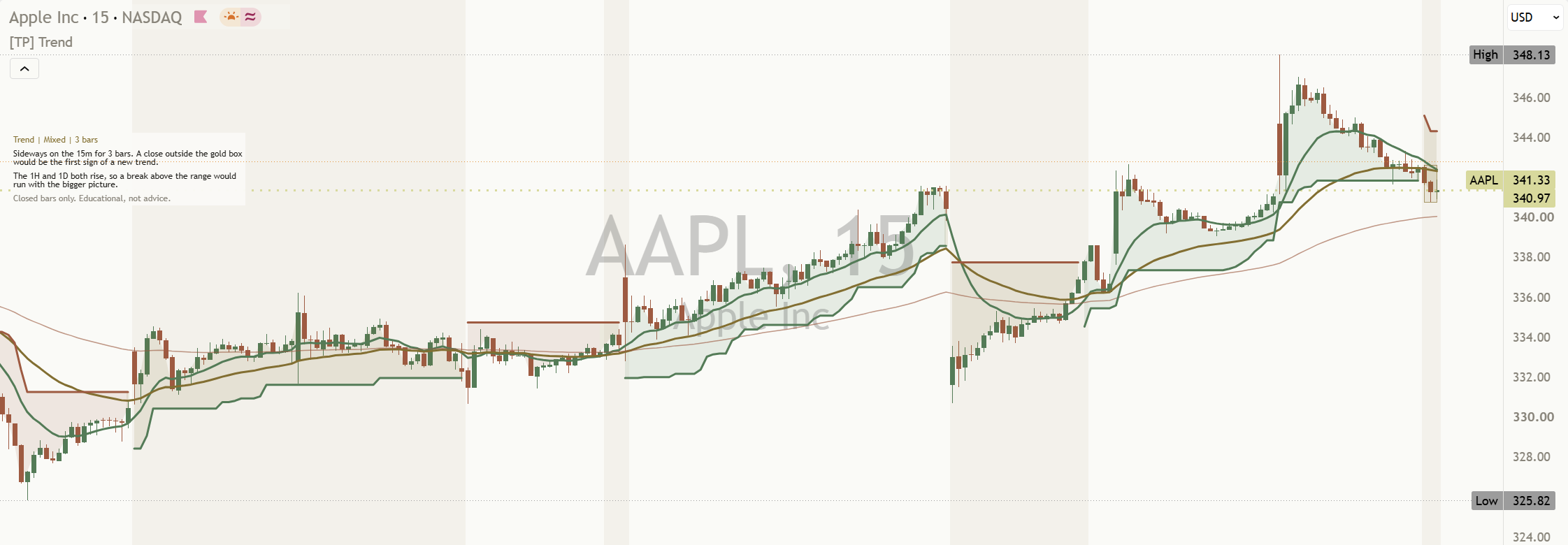
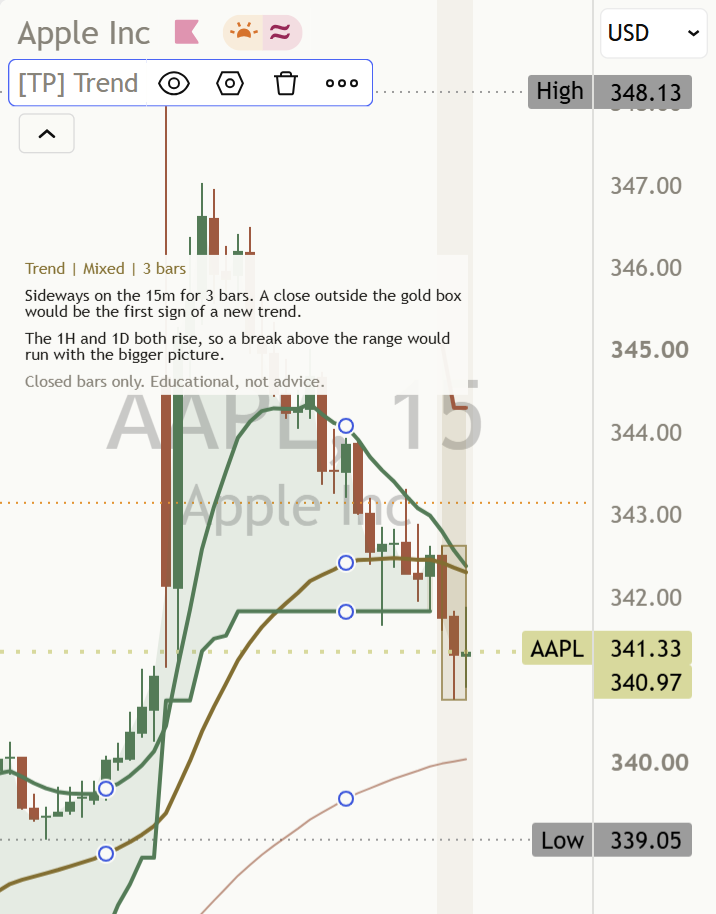
Trend tools flip back and forth when the market goes sideways. This one calls it sideways, counts how long it has lasted, shades it amber and frames the range in a gold box: "Sideways on the 15m for 3 bars. A close outside the gold box would be the first sign of a new trend."

Each part, up close

Rising and falling markets are treated the same way throughout. Every read has a version for each direction.

AAPL 15 minute chart, default settings: several stretches shaded with a faint amber background where the read was mixed, between rising stretches with no background.

The amber band: sideways made visible

A faint amber background marks every bar where the read is mixed: the averages are tangled, or the averages and Supertrend disagree. In sideways markets, price keeps crossing back over the averages and trend tools flip again and again. This background shows you those stretches at a glance, and the panel header switches to Mixed and counts how many closed bars it has lasted.

Mixed is not a failure to find a trend. It is often the most honest read on the chart. The stretch ends only when the averages and Supertrend line up again on a closed bar.

Back to the chart
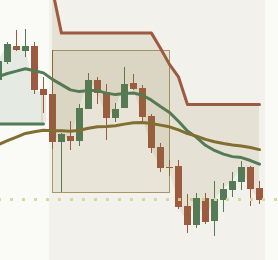
Close-up from the NAS100 4 hour chart: a gold box around a sideways stretch inside a faint amber background. The box ends where price closed below it, and the candles after it keep falling. No price labels; the box alone shows the range.

The sideways range box

When the read turns mixed, a gold box starts around the price range. It is built from the first 8 sideways bars, then its high and low freeze. There are no price labels: the gold box alone shows the range, so nothing sits on top of the lines. The box keeps extending while the market stays sideways. The panel says what that means:

Sideways"Sideways on the 15m for 3 bars. A close outside the gold box would be the first sign of a new trend."

The close outside the range

The box ends before the first close outside it. From that bar, the main read says which side and how long ago, and the context line says whether the bigger picture backs the break:

After a break"Price closed below the range 9 bars ago; a new downtrend is trying to start."

Bigger picture"The 1D and 1W both rise, so this break below runs against the bigger picture."

The alert "Price closed outside the sideways range" fires on that same closed bar, so the chart, the panel and the alert always match. Only the most recent sideways range is drawn. A stretch shorter than 8 bars never freezes its range, so it has no exit alert. Switch the box off with "Show sideways range box".

Back to the chart
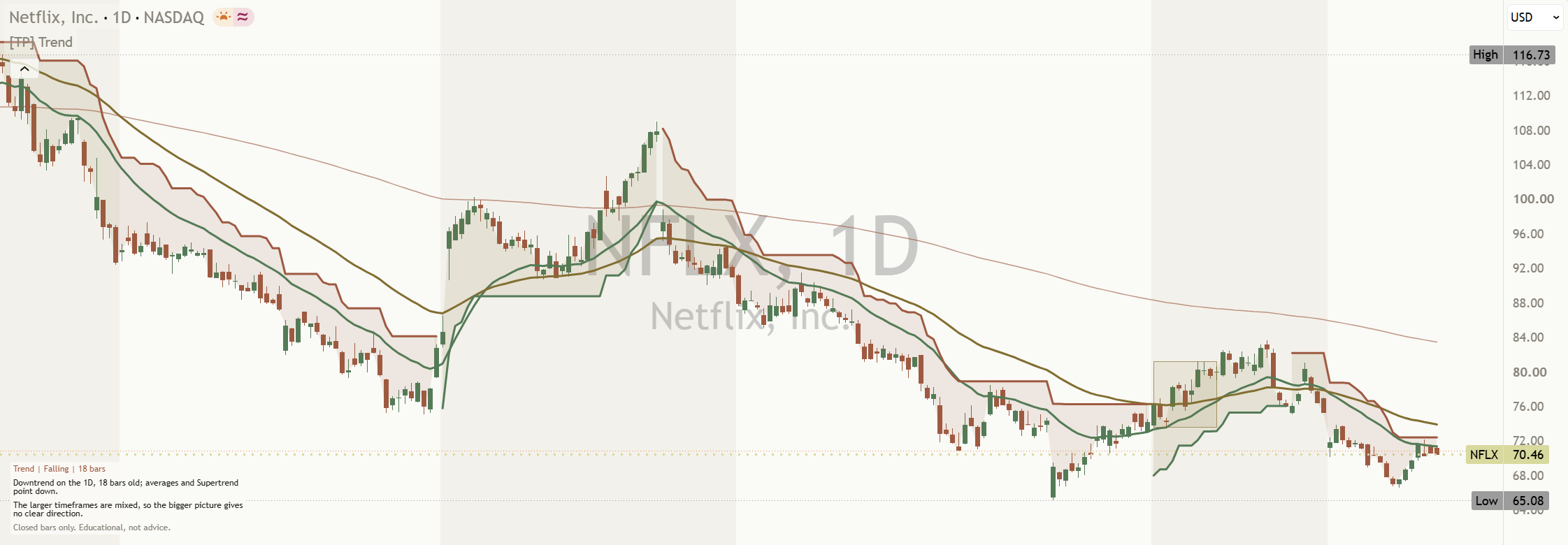
NFLX daily chart, default settings: the Supertrend line steps down above price in orange through the falls, breaks, and runs below price in green through the rise in the middle of the chart.

The closed-bar Supertrend

A line that trails price at a distance set by the recent average true range (ATR). It sits below price in green while rising and above price in orange while falling. It is calculated with TradingView's built-in Supertrend, with a factor of 3.0 by default.

It only changes direction when a bar closes, and the line breaks where it changes side rather than joining the two. So the line you see on history is the line you would have seen at the time: a little later, but it does not flicker.

Back to the chart
NAS100 4 hour chart, default settings: a light green fill between price and the Supertrend line through the rises, and a light gold fill where the read is mixed.

The filled zone

A light fill between price and the Supertrend line, in the colour of the trend read: green while rising, orange while falling, gold while mixed. It makes the state easy to see without reading the panel. You can switch it off ("Show filled trend zone") or make it lighter or darker with "Fill opacity" (88 by default; higher is lighter).

Back to the chart
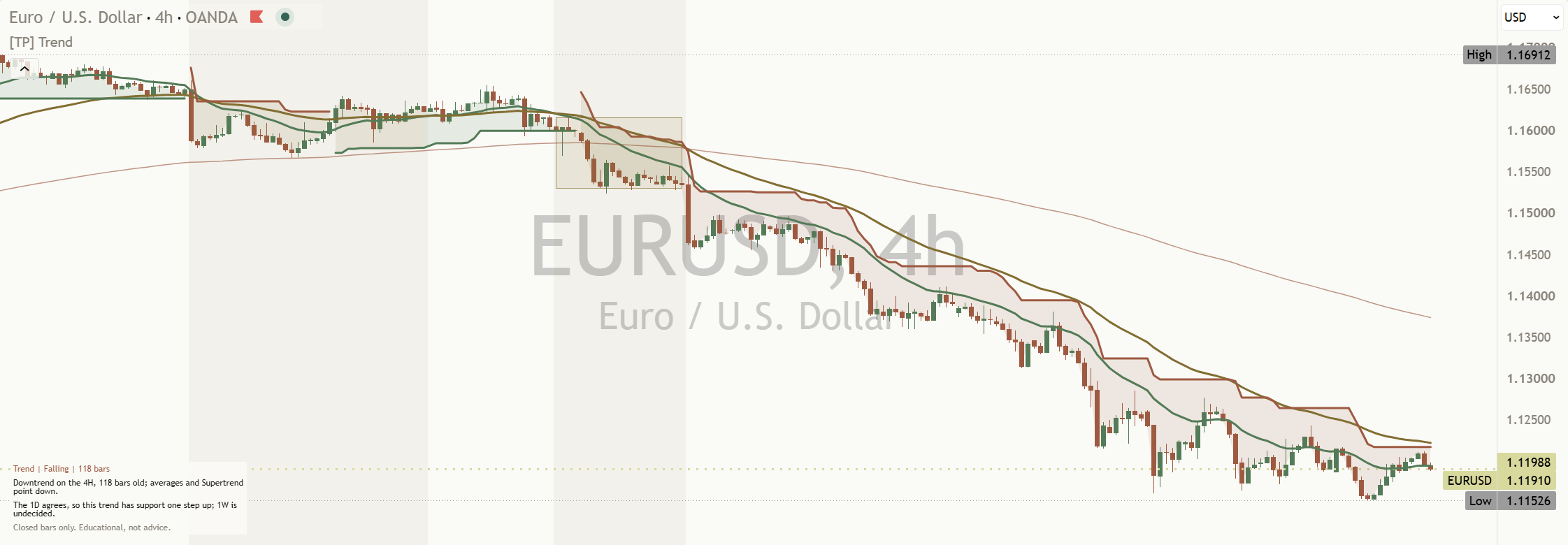
EURUSD 4 hour chart, default settings: through a long fall the green fast average sits below the gold middle one, and the gold middle one below the pale orange slow one.

The three averages: fast and middle, then slow

Three exponential moving averages (EMAs): fast, middle and slow. On a 4 hour or daily chart they are 20, 50 and 200 bars long. The read is about their order:

  • Pointing up: fast above middle, and middle above slow.
  • Pointing down: fast below middle, and middle below slow.
  • Tangled: any other order, including two averages being equal. No clear trend.

The fast line is green, the middle line is gold and the slow line is a thinner pale orange. All three are shown by default. The line colours only say which line is which. They do not change with the trend.

Back to the chart
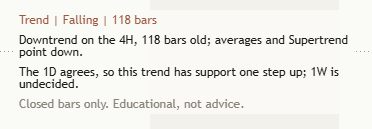
Close-up of the Compact Mentor panel from the EURUSD 4 hour chart, reading: Trend, Falling, 118 bars. Downtrend on the 4H, 118 bars old; averages and Supertrend point down. The 1D agrees, so this trend has support one step up; 1W is undecided. Closed bars only. Educational, not advice.

The Mentor panel

It sits on the price chart itself, with no separate pane, always on the left so the newest bars on the right stay clear. Panel position has three choices: Auto (the default), Top Left or Bottom Left. Auto uses Bottom Left when the highest price on screen sits in the left third of the chart, and Top Left otherwise, just below TradingView's own legend. The default Compact style is 6 short lines:

  • The header on one line, in the colour of the state: Trend, then Rising, Falling or Mixed, then its age in bars.
  • The main read, on two lines: "Downtrend on the 4H, 118 bars old; averages and Supertrend point down."
  • The larger-timeframe read, on two lines: "The 1D agrees, so this trend has support one step up; 1W is undecided."
  • The footer on one line: "Closed bars only. Educational, not advice."

It describes rather than instructs. More on what it says to you at every level.

Back to the chart

Two panel styles, one switch

Compact (default)

6 short lines: the header with the state and its age, the main read, the larger-timeframe read and the footer. Small enough to stay clear of the newest candles, even on a phone.

Full

Adds 3 muted rows. First, how steady the read is. In a trend, that is how far apart the averages are, measured against the ATR (under half an ATR reads compressed, above one and a half reads stretched). While the market is sideways, it says whether Supertrend has been whipsawing: "Supertrend has held one side for most of the last 30 bars, so the sideways spell is quiet, not choppy." Second, the preset in use and why. Third, the colour key in plain words.

Best settings: the Timeframe preset

"What are the best settings?" is the most asked question under trend tools. There is no single best setting and no best timeframe. The read describes the chart you open, so the lengths should match that chart. The Timeframe preset does that for you. On Auto (the default) it picks one from your chart's timeframe. In the Full style the panel names the set in use, what it suits, and that Auto chose it.

Scalp

Charts up to 5 minutes. Fast, medium and slow EMA 8, 21 and 55. Supertrend ATR length 7.

Intraday

Charts from 6 minutes to 1 hour. EMA 12, 36 and 100. Supertrend ATR length 10.

Swing

Charts above 1 hour through Daily. EMA 20, 50 and 200. Supertrend ATR length 10.

Position

Charts above Daily. EMA 50, 100 and 200. Supertrend ATR length 14.

Custom

Your own lengths: Custom fast EMA length (12), Custom medium EMA length (36), Custom slow EMA length (100) and Custom Supertrend ATR length (10). They must rise from fast to slow, or the header asks you to check the settings.

The Supertrend factor (3.0 by default) applies to every preset; a larger number reacts less often. The presets are educational starting points, not promises.

Larger-timeframe context (on by default)

Two larger timeframes, completed bars only

The panel reads the same trend on a larger timeframe and an anchor, from their last completed bars. Auto steps one level above your chart (5m to 30m read 1H, 1H reads 4H, 4H reads 1D, 1D reads 1W), or choose one yourself in Manual mode. The anchor is the 1D on intraday charts (the 1W when the first step up is already the 1D), the 1M on a daily chart and the 3M on a weekly chart.

What the row says

In a trend it says whether the bigger picture backs it, for example "The 1D agrees, so this trend has support one step up; 1W is undecided." When the chart runs the other way, it says this is either a pullback or an early turn. While the chart is sideways, it says which way a break would line up with the bigger picture. After a break, it says whether the break runs with or against it: "The 1D and 1W both rise, so this break below runs against the bigger picture."

How the Mentor helps you at every level

Same indicator, same panel. What you take from it grows with you. These are real lines the panel wrote on the charts on this page: a market falling, a market going nowhere, and a range that has just broken.

  1. Level 1

    Beginner

    What gets in the way

    • Colours on the chart that nobody explains.
    • One moving average cross read as a new trend.
    • No idea which settings to use.

    The habit it builds: asking "are the averages in order, or tangled?" in words you would use yourself.

    What the Mentor says

    Falling"Downtrend on the 4H, 118 bars old; averages and Supertrend point down."

    Sideways"Sideways on the 15m for 3 bars. A close outside the gold box would be the first sign of a new trend."

  2. Level 2

    Intermediate

    What gets in the way

    • A flip that appears during a bar, then vanishes.
    • Two tools that disagree, and no way to say so.
    • Not knowing how long a trend has held.

    The habit it builds: waiting for the close, and treating disagreement between the tools as a read of its own.

    What the Mentor says

    Range break"Price closed below the range 9 bars ago; a new downtrend is trying to start."

    Footer"Closed bars only. Educational, not advice."

  3. Level 3

    Advanced

    What gets in the way

    • Hunting for a faster setting to fix sideways flips.
    • Comparing reads made at different lengths.
    • Forgetting that every trend tool reacts late.

    The habit it builds: knowing how stretched the averages are, how often the market has whipsawed, and which lengths the read uses (all in the Full style).

    What the Mentor says

    Whipsaw check"Supertrend has held one side for most of the last 30 bars, so the sideways spell is quiet, not choppy."

  4. Level 4

    Expert

    What gets in the way

    • Fatigue: the tenth chart of the day gets less care than the first.
    • Your own bias quietly reading every move against the trend as a turn.
    • Larger-timeframe reads taken from bars that are still open.

    The habit it builds: a consistent second pair of eyes: two larger timeframes read from completed bars, the pullback-or-turn question asked every time, and five descriptive alerts that watch for you.

    What the Mentor says

    Support"The 1D agrees, so this trend has support one step up; 1W is undecided."

    Against"The 1D and 1W both rise, so this break below runs against the bigger picture."

It reads every kind of market

Rising Averages and Supertrend both up

The averages point up and Supertrend agrees. The zone is green, the header reads Rising and counts how many closed bars it has held, and the main read leads with the uptrend and its age.

Falling Averages and Supertrend both down

Read exactly the same way, mirrored. The zone is orange and the age counts the same.

"Downtrend on the 4H, 118 bars old; averages and Supertrend point down."

Mixed Tangled, or the tools disagree

No direction is set. The Mentor calls it sideways and counts how long, the zone turns gold, the faint amber background marks the stretch and the gold box frames the range.

"Sideways on the 15m for 3 bars. A close outside the gold box would be the first sign of a new trend."

Three things to remember

  1. Late is steady. Moving averages and Supertrend are built from past prices. A tool that reacts sooner has to flip more often.
  2. Close, not intrabar. The state changes when a bar closes. A move through the line that closes back is not a change.
  3. Mixed is an answer. Sideways markets are common, and trend tools whipsaw inside them. "Mixed" is a real read, not a failure to find one. A close outside the gold box is a first sign, not proof.

Honest about timing, fair about settings

How it avoids repainting

The trend state, its age, the Supertrend line, the zone colour, the amber background, the gold box, the optional markers and all 5 alerts update only when a bar closes, and do not change afterwards. Larger-timeframe context reads only completed larger-timeframe bars. The panel always shows the read from the last closed bar. Like any moving average, the EMA lines themselves follow the live price while the bar is open; the state they feed waits for the close.

Why two charts disagree

Short lengths react quickly and flip more. Long lengths react slowly and flip less. The same market can read rising on one preset and mixed on another. Neither is wrong: they answer different questions. Pick a timeframe and keep it, so your reads stay comparable.

Trends are always confirmed late, and sideways markets whipsaw every trend tool. Until there is enough history, the header says it is warming up instead of guessing. On a daily chart the slow average needs 200 bars.

AAPL 15 minute chart, default settings: the read has just turned mixed, a small gold box starts at the right edge, and the Mentor panel at the top left says it has been sideways on the 15m for 3 bars and that a close outside the gold box would be the first sign of a new trend.
A sideways market is called mixed, not forced into a trend.
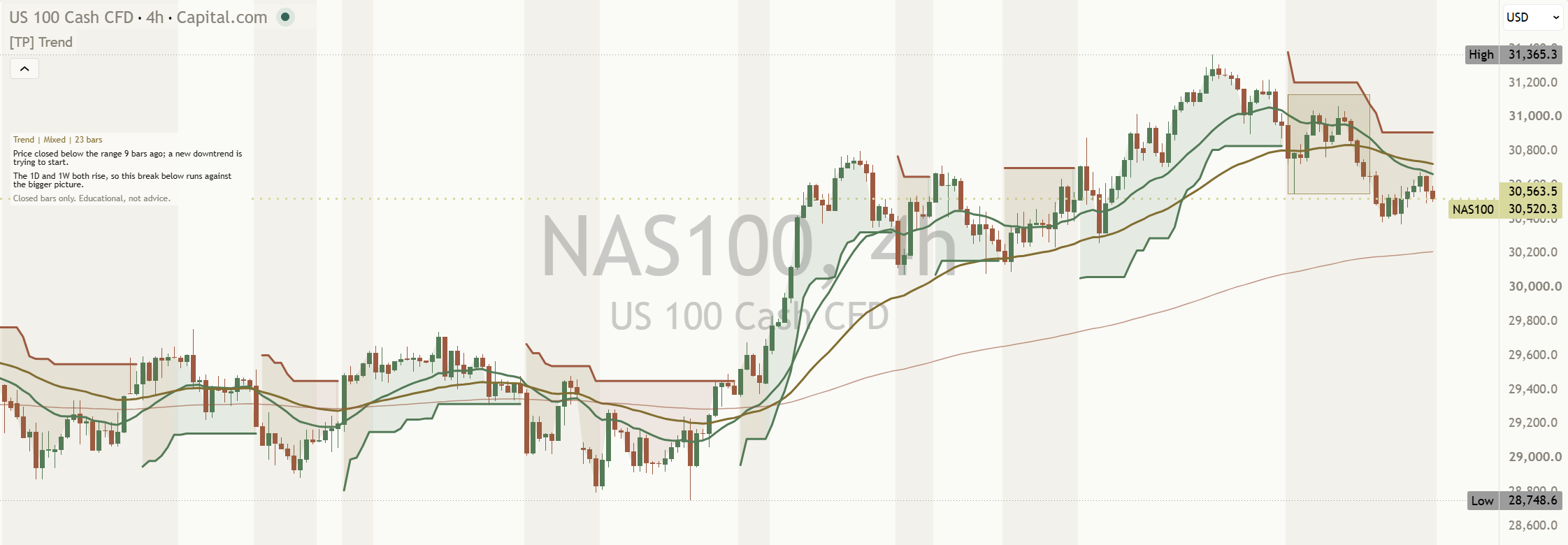
NAS100 4 hour chart, default settings: price has closed below a frozen gold box, and the Mentor panel at the top left says a new downtrend is trying to start and that the 1D and 1W both rise, so the break runs against the bigger picture.
After a range break, the main read and the bigger-picture read agree with each other and with the box.
The same AAPL 15 minute chart at phone width: the Compact panel stays readable at the top left and the newest candles on the right are clear.
At phone width the Compact panel stays readable and the newest bars stay clear.

Settings

The defaults are built to work out of the box. These are the ones worth knowing.

On a small screen, swipe the table sideways to see every column.
SettingWhat it doesDefault
Timeframe presetSets the EMA and Supertrend ATR lengths. Auto matches the chart timeframe. Custom uses the four lengths below.
AutoScalpIntradaySwingPositionCustom
Auto
Supertrend factorHow far the Supertrend line sits from price, in ATR units. A larger number reacts less often.3.0
Custom fast / medium / slow EMA lengthUsed only when the Timeframe preset is Custom. Must rise from fast to slow.12 / 36 / 100
Custom Supertrend ATR lengthUsed only when the Timeframe preset is Custom.10
Show larger-timeframe contextAdds reads from completed bars on a larger timeframe. Larger timeframe mode is Auto or Manual; Manual larger timeframe must be above the chart.On, Auto (Manual: D)
Show anchor contextAdds a second completed-bar context, using Daily on intraday charts unless Daily is already selected.On
Show fast and middle EMA linesThe green fast and gold middle lines.On
Show slow EMA lineThe thinner pale orange slow line that completes the three-line order.On
Show Supertrend lineThe closed-bar Supertrend, broken across direction changes.On
Show filled trend zone / Fill opacityThe light fill between price and the Supertrend line. Higher opacity values make it lighter.On / 88
Mark mixed or sideways backgroundThe faint amber background while the read is mixed.On
Show sideways range boxThe gold box built from the first 8 sideways bars, then frozen. It ends before the first close outside it.On
Show state-change markersA small mark on the Supertrend line at each closed-bar change: a green circle for rising, an orange circle for falling, a gold diamond for mixed.Off
Line widthThickens every trend line, from 1 to 4.2
Label sizeThe size of the state-change markers.
TinySmallNormal
Tiny
Panel positionWhere the panel sits on the price chart. It always stays on the left, so the newest bars on the right stay clear. Auto uses Bottom Left when the highest price on screen sits in the left third of the chart, and Top Left otherwise.
AutoTop LeftBottom Left
Auto
Panel text sizeThe size of the panel's text. 4 sizes, the same as every Titan indicator.
TinySmallNormalLarge
Tiny
Line width in charactersHow wide the two sentence rows wrap, from 60 to 90. The header and footer always stay on one line.60
Panel styleCompact is 6 short lines: header, main read, larger-timeframe read and footer. Full adds 3 rows: how steady the trend is, the preset in use and the colour key.
CompactFull
Compact
ThemeAuto follows your chart background brightness, or force Light or Dark.
AutoLightDark
Auto

The defaults are a sensible starting point; most traders can leave them and change only the look. If the lines are hard to see, Line width makes them thicker.

Every setting has a small (i) next to it. Hover over it, or tap it on a phone, and it explains that setting in one line, right there on your chart.

Light or dark, it matches

The indicator's colours come in a warm light and a warm dark palette, with muted green and orange, and gold and amber kept for sideways. Light uses the Paper palette and Dark uses Ink. With Theme on Auto, the Mentor picks the right palette for your chart background. No setting needed.

Alerts

Five alert conditions, each named in plain English. Open TradingView's alert dialog, pick this indicator in the condition box, and choose the condition by name. Every one waits for a closed bar. The message describes what happened. It never tells you what to do.

  • Trend state changed to risingTrend Mentor changed to rising on a closed bar. The chart and Mentor panel show the same confirmed state.
  • Trend state changed to fallingTrend Mentor changed to falling on a closed bar. The chart and Mentor panel show the same confirmed state.
  • Trend moved into mixedTrend Mentor moved into mixed on a closed bar. The chart and Mentor panel show the same confirmed state.
  • Trend state changedTrend Mentor changed state on a closed bar. The chart and Mentor panel show the same confirmed state.
  • Price closed outside the sideways rangePrice closed outside the sideways range.

"Trend state changed" covers any of the first three. The range alert fires on the first close outside the frozen gold box, and the box ends just before that bar. The alerts, the markers and the panel all use the same closed bar, so an alert never arrives without a matching change on the chart.

Learn more

Start with the lesson, then watch the indicator explained.

Watch it explained

Video · 2:54How to read [TP] Trend - MentorEvery part of the indicator, one at a time, on real charts: the three averages, the closed-bar Supertrend, the zone, the amber background, the gold sideways box, the presets, and what the Mentor panel is telling you.
Video · 2:56Trends explainedMoving averages, lag and why sideways markets fool trend tools, in plain English. Concept first, then the indicator. Read the full lesson

One concept, read well

[TP] RSI - Mentor, [TP] Volume - Mentor, [TP] Market Structure - Mentor, [TP] Trend - Mentor, [TP] VWAP - Mentor, [TP] Fibonacci - Mentor, [TP] MACD - Mentor, [TP] Bollinger Bands - Mentor, [TP] Regime - Mentor and [TP] Market Board - Mentor each read one thing deeply, for free. Markets rarely move on one thing. The full Titan suite reads them together: momentum, volume, trend structure and flow, combined into one plain-English read.

Questions

Is it free?

Yes. [TP] Trend - Mentor is free on TradingView. Add it from the Indicators menu. Nothing is locked.

What are the best settings?

There is no single best setting and no best timeframe. The read describes the chart you open, so the lengths should suit that chart. Leave Timeframe preset on Auto and it matches them for you: Scalp (EMA 8/21/55, ATR 7) up to 5 minutes, Intraday (12/36/100, ATR 10) from 6 minutes to 1 hour, Swing (20/50/200, ATR 10) above 1 hour through Daily, and Position (50/100/200, ATR 14) above Daily. Pick a timeframe and keep it, so your reads stay comparable.

Does it repaint?

No. The trend state, its age, the Supertrend line, the zone colour, the amber background, the gold box, the markers and all 5 alerts update only when a bar closes and do not change afterwards. Larger-timeframe context reads the last completed larger-timeframe bar. Like any moving average, the EMA lines follow the live price while the current bar is open, but the state they feed waits for the close. The panel footer says "Closed bars only. Educational, not advice."

What do the colours mean?

The EMA lines are coloured to tell them apart: fast green, middle gold, slow pale orange (thinner). They do not change with the trend. The Supertrend line is green while rising and orange while falling. The filled zone is green while rising, orange while falling and gold while mixed. A faint amber background and a gold box mark sideways. The Full panel style prints this key on the chart in one plain row.

How does it show a sideways market?

Three ways. A faint amber background on every mixed bar. A gold box around the range, built from the first 8 sideways bars and then frozen; there are no price labels, the box alone shows the range. And the panel: the header reads Mixed with its age in bars, and the main read says, for example, "Sideways on the 15m for 3 bars. A close outside the gold box would be the first sign of a new trend." After a close outside the box, it says which side price broke and whether the bigger picture backs it. The Full style also says whether Supertrend has been whipsawing over the last 30 bars.

Why does it keep flipping in a sideways market?

Because moving averages and Supertrend react after price, and in a sideways market price keeps crossing back over them. Every trend tool whipsaws there. Trend - Mentor does not hide it: it calls those stretches sideways, shades them amber and frames them in a gold box, so you can see the sideways market instead of reading each flip as a new trend. A faster setting flips more, not less.

Which alerts can I set?

Five: "Trend state changed to rising", "Trend state changed to falling", "Trend moved into mixed", "Trend state changed" (any of the three) and "Price closed outside the sideways range". All fire on a closed bar, the same bar the chart and panel show.

Does it tell me when to act?

No. It describes whether the averages are in order, whether Supertrend agrees, how long that has held and what larger timeframes say. A trend read describes what price has done, not what it will do. Decisions stay with you.

Can I change the EMA lengths?

Yes. Set Timeframe preset to Custom and use the four Custom lengths: fast EMA (12 by default), medium EMA (36), slow EMA (100) and Supertrend ATR (10). The three EMA lengths must rise from fast to slow; if they do not, the header asks you to check the settings. The Supertrend factor can be set on its own for every preset.

What does "running against the larger picture" mean?

The chart's read points one way and a larger timeframe points the other. That is either a pullback within the larger move or an early turn. Nobody can know which at the time. Whether the chart's averages and Supertrend hold the new direction over the next closed bars is what shows it.

Which markets and timeframes does it work on?

Any symbol on TradingView, on any timeframe. It needs history: on a daily chart the slow average needs 200 bars, and the header says it is warming up until it has them. There is no best timeframe; the read describes the chart you open, so match it to the trends you care about and keep it consistent.

The panel takes up too much room. What can I do?

Compact, the default, is 6 short lines, and it always sits on the left so the newest bars stay clear. Panel position on Auto moves it between Top Left and Bottom Left to find the emptier corner; you can also fix it to Top Left or Bottom Left. Panel text size changes the text, and "Show Mentor" switches the panel off.

The lines are hard to see. Can I make them bigger?

Yes. Line width thickens every trend line, from 1 to 4. Label size makes the optional state-change markers larger, and the panel has its own Panel text size.

Get our weekly market brief free.